Showing posts with label photo editing. Show all posts

Thursday, January 16, 2014

Tech Tuesday for January 14

Welcome back everyone! We had some snow days added to our break and I hope everyone enjoyed their time off. I'm excited to share some cool things with you and ask you for a little favor if you have the time.


Richard Byrne is great at finding and sharing amazing tools for educators to check out and possibly integrate into their classroom. His website, Free Technology for Teachers, is always a "go to" spot for me when I am looking for something new to check out for my classroom. 

In this post, Richard shares 7 great whiteboard tools that teachers and students can use to collaborate. If you have been looking for other tools to use with your Smartboard in your classroom, take a few minutes and check out what Richard has shared on his site. 


iPiccy is a free photo editing website. All of the touch-ups or photo editing you have wanted to do, but felt you couldn't because you didn't have Photoshop, can be done on iPiccy. 

Here is an example,
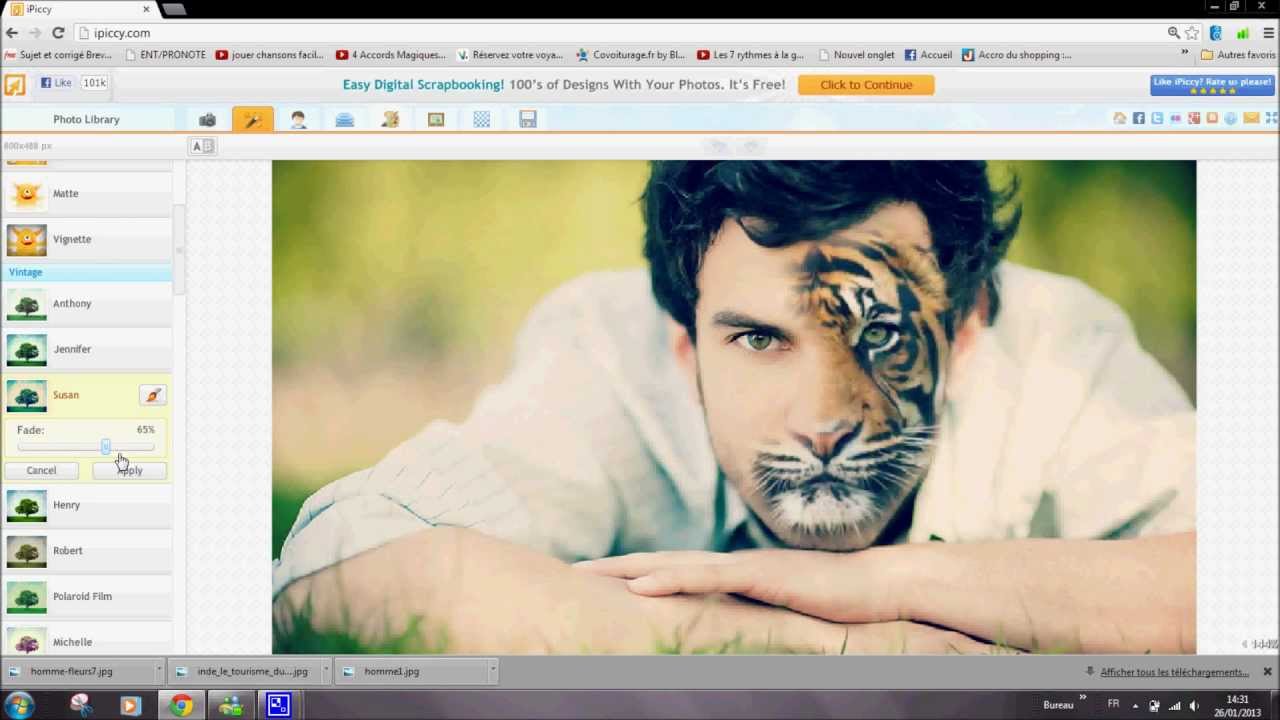

I'm not sure how often you will need to create a Tiger/Student hybrid for your class, but you could do it with iPiccy. I have used it for quick cropping and some added text for things on my website or slides for presentations.

You do not need extensive photo editing experience to figure out iPiccy. It will guide you along the way and you will become a photo editing guru in no time.  


Before break, I signed on with Corwin Publishing to write educational technology books. My first endeavor is a book about Cloud Computing. As part of the book, I want to feature teachers that are using these tools to provide practical examples for other teachers to see how they are used in the classroom. 

I know there are many great things happening in this district and I would love to share them with the world in my book. If you have some time, please fill out this survey and share how you use Cloud Tools in your classroom. 


Thanks you so much for your time and have a great day! 


Tuesday, May 1, 2012

Tech Tuesday for May 1

Happy May Day everyone! I apologize for the long space between posts, but I've been working hard with many of the great teachers in this district on integrating technology into their lessons. I've also been putting together a Google Apps for Education resource page. Many teachers have asked about the various Google tools and I thought a page dedicated to the various Google Apps might come in handy for the district in the future. If you are a Google person, please take a moment to look at the resources for the various tools. I'm a Google Guy and I am always learning something new.

Digital Citizens 

Here is a great article on digital citizenship that teachers should take some time to read. Schools have always prided themselves with creating good citizens. The definition of "good citizen" looks very different in the digital age. How are you helping create good digital citizens in your class?

Web Tools Finder

Finding new web tools to add to your tool box can be a daunting task. There are so many out there and you are not sure if they are right for you. In this post, you will be able to see 5 sites that will help you find the perfect tool for you. This is worth bookmarking for the summer as you explore ways to integrate technology into your lessons.

Online Photo Editing Options

Mashable put together a list of 7 Free Alternatives to Picnik. Too often teachers are looking for ways to edit photos for various lessons and do not want to spend the money or the time using Photoshop. While none of these offer all of the same resources as Photoshop, they will provide what most people need in photo editing. If you are looking for more tools for students to utilize without the expense, take a look at these free alternatives for your next project.

Super Awesome Tips and Tricks for you iPad

Here is an awesome site that gives you over 40 tips and tricks with your iPad. Starting with taking a screenshot and ending with setting up restrictions, this post shares everything you need to know about your favorite tablet. You might not get all of these at once, but the page is worth saving for later.

Interactive Whiteboard Resources

Here is a list of 65 resources that will work well on your Smartboard. I did not try out every single site to see if they would play well on our computers, but there are plenty that do work and could go over well in class. Check these out and share with others when you find ones you like.

Don't forget to check out the Google Apps for Education page I created. It is full of amazing resources to help you utilize GAFE in your classroom and professional life.

- Give it a try!

Tuesday, March 27, 2012

Happy Tech Tuesday March 27

Happy Tech Tuesday everyone. I'm excited to share another cool web tool I think is worth checking out.

SuperLame

This seems like the perfect name for my blog, but this is actually a great site. SuperLame is a site that allows people to upload photos, add speech bubbles, word balloons and other features to create a fun project. One of the things I love about this tool is that it does not require a log in, registration or even an email address. This is perfect to use for all ages. I was able to upload a photo, add a word bubble and a "sound effect" in just over a minute. After I was done, I downloaded the picutre and posted it here.


I can see this being a fun way to get students used to some minor photo editing and uploading for various projects. For those of you having student create more web-based work, this is a great tool for students to create photos and add them to their work.

Give this a try!

Tuesday, March 20, 2012

Tech Tuesday March 20th

Happy Tech Tuesday and First Day of Spring everyone! I hope you have been leaving your technology indoors and have been enjoying the beautiful weather. I assure you, there is no app for these beautiful days.

I have one really great site to show you today. Let me know if you have any questions.

Apple Update

On Wednesday. Apple announced their new iPad, their new Apple TV and their software update, iOS 5.0.1. If you have an Apple Device, you should consider the update. It does not take very long and has some nice additions. Sorry, no Siri if you do not have a 4S. Here is a great article by Mashable explaining how to update your device. This applies for all iPads, iPhones and iTouches.

iPiccy

iPiccy is a free online photo editing tool. It does not require any registration of sign up. You can upload any photo you want and start to edit it using the tools provided. Here is a quick photo I edited this morning.


The picture on the left is the original and is at least 6 years old. The one on the right is the one that I edited this morning in only a few minutes. Notice the brighter colors and better cropping of the photo.

I'm not a photo editing expert. I just played with the settings until I liked what I saw. iPiccy is perfect for photo editing anywhere and anytime. I was able to save the file onto my desktop without any problems.

This could be great for quick photo edits at home or for student projects.

Give it a try!