Showing posts with label High School. Show all posts

Tuesday, October 4, 2011

Tech Tuesday for October 4

Happy Tuesday everyone! Here are some cool things I wanted to share with you this week. I've had a chance to get into some of the school this week and I love what you are all doing. I see why we are one of the best districts in the state. Keep up the great work and let me know how I can support the wonderful things you do every day.

Outlook Tip

One of the things that teachers are now dealing with as they use their Smartboards more is having their computer screen on display at most of the time. That isn't a big problem, but some people have their email settings in such a away that it pops up to notify you when a new message appears. Sometimes, you do not want kids to see that, so here is a way to turn that off.

When you have opened your Outlook, you will see this icon next to the time. That is your Outlook icon. 

Move your arrow over the icon and right click on your mouse.


To get rid of the "Show New Mail Desktop Alert", simple click the heading and the check will vanish. You will no longer get the notifications while working on other documents. If you want to turn it back on, just follow the same directions and select the heading again to turn them on.

Math Fun!

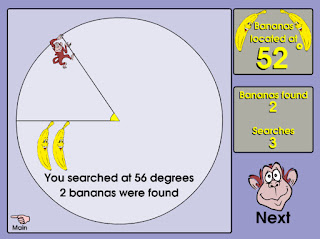
Here are some fun sites I found on my Google Reader. Thanks to Karen Ogen and her site  InTec InSights: Technology Integration Ideas for the Classroom for the info. Here are just a couple. Please check out her sight for more information.

Squirt The Dog

Banana Hunt
I hope everyone has a great week and I hope to see many of you in your classroom very soon.

Give it a try!

Tuesday, September 27, 2011

Happy Tech Tuesday for 9/27

Happy Tech Tuesday everyone! I hope the week is going well. I have a couple of things I want to share with you that you might find helpful.


I want to remind everyone that Mike and I have split the district to best help teachers with their technology curriculum needs.


Mike: North, Parcells, Ferry, Mason, Poupard, Kerby, Monteith and Barnes.

Nick: South, Brownell, Pierce, Defer, Maire, Richard, Trombly and Barnes.

Feel free to email us and set a time to meet. We have already been in some buildings helping teachers and it has been great. We look forward to meeting with you helping you integrate technology into your already brilliant lesson plans.

I found this on my Google Reader the other day and I love it. This site has over 250 pictures that pose a question for the reader. Here is one example that I love,


Here is another fun one,


I think this would be great for most ages at the start of class. Check it out and see how you could use it.


This is just a fun site that would be great for little kids. It allows you to draw pictures that interact with a preset story. This would be great to use on a Smartboard.

This is a great article on Edutopia on the use of Cell Phones in the classroom. The article has some links to sites that are designed to help teachers utilize the cellphones the students have in class. If you have been thinking of ways to use the phones in your classroom, here is the perfect article for you.

I hope you find these sites helpful. If you have something you would love to share with the rest of the district, please feel free to leave a comment or send me an email.

Give it a try!

Nick Provenzano

Friday, February 12, 2010

60Second Recap

I found this site today and I have to share it with everyone. As an English teacher, it is tough to get students to read "Classics". They complain about the language and want to know how this will ever be important. I spend countless hours coming up with lessons to intorduce the novel in a fun way in the hopes to hook some of the reluctant readers. 60Second Recap is a great site to use to really help students get a handle on what the story is about.

Here is their Mission Statement:

"60second Recap™ wants to make the great works of literature accessible, relevant, and, frankly, irresistible to today's teens. Through 60second Recap™ video albums, we seek to help teens engage with the best books out there ... not just to help them get better grades, but to help them build better lives."

I love this mission statement. It really expresses the goal of all literature teachers. I watched the first video on Hamlet, my favorite Shakespeare play, and was very happy with what I saw. Hamlet, played by Jenny, is taking an online quiz, "Are you Mad?" It gives a nice bit of information about different aspects of the play. There are videos on Motif, Theme, Plot, Symbols, and the Characters in the play. It was a very well put together piece.

60Second Recap currently offers recaps of some great pieces of Literature. Here are just a few:


Animal Farm
Brave New World
Fahrenheit 451 (On my Top 5 All Time List)
The Adventure of Huckleberry Finn
Catcher in the Rye (On my Top 5 All Time List)
The Great Gatsby (On my Top 5 All Time List)

There are many more great pieces of Literature that get the 60Second Recap treatment. I strongly encourage all Literature teachers to give this site a look over and use them with your students.

-Give it a try!

Thursday, February 11, 2010

Abstract Art Without The Mess

I learned about this site from @Ktenkely on her website iLearntechnology. It's an interacitve site that allows you to create Jackson Pollock style paintings without any of the mess. This is great fun on the Smartboard. By clicking the mouse you change to a random color and splashes of paint appear as you move the mouse across the screen. JacksonPollock.org is a wonderful site that art teachers can use that will save you a big cleanup in the future.

-Give it a try!

See The World From Your Classroom

Here is a great site teachers can use to explore different parts of the world. Here are some of the places you can go:

Explore the Taj Mahal
Stonehenge
 
Mount St. Helens

The Supreme Court

US Capitol Virtual Tour
 
Louvre
 
Just click on this link and you will have access to 100 Great Trips you can take your students on.
 
Give it a Try!

Tuesday, February 9, 2010

Pictures Galore

Here is a great site for teachers to use and share with their students. National Geographic has put many of their great photographs online. These can be a great resource in Social Studies classes. Take a look around and see how you might use these images in your class. Maybe they can add a little spice to your powerPoint Presentation you have been using for a few years. Take a look around here.

Give it a try!

Thursday, February 4, 2010

Math Teachers Unite!

It was brought to my attention that it is World Math Day on March 3rd by Kelly Tenkely and her iLearn Technology blog post. I thought this would be a fun site to share with the Math teachers in the district. It's a free site for students 5-18 years old and they can practice Math with various games leading up to the main event on March 3rd. The main event is a competition that involves 60 second games and points are awarded to the student for every correct answer. The goal for a students is receive the most points and enter the Hall of Fame. It looks like a nice way to change up the pace for a day and really let kids have a chance to use their math and take some pride in their skills. Plus, wouldn't you want to brag if your students made the Hall of Fame? You know I would. :-) Check out the World Math Day site or iLearn Technology for more details.

-Give it a try!

Wednesday, February 3, 2010

Helpful Science Websites

Posted from Diigo.

Side Bar - Another cool thing about using Diigo is that these links were posted on my blog from the site. All I needed to do was add a few comments at the top and the post is good to go. Diigo Rules.

-Give it a try!